Backup
PR is able to convert and use your UB configs! Click here on how to achieve that.
VehicleDivision
Before explaining the structure of the config files, this is the equivalent of UB's VehicleSet
and is used through-out all config files. It's essentially a variation of a unit. It consists of:
spawn_distance: The dispatch radius (in meters) of this divisionchance: The chance that this division is pickedname_list_id: The list of names that this division should usek9_model: The model of the K9 used in a K9 unit definition (chop,husky,shepherd,rottweiler,retriever)k9_tex_face: The texture of the K9's face componentk9_tex_shirt: The texture of the K9's shirt componentk9_tex_accessories: The texture of the K9's accessories componentPeds: List ofPedelementsVehicles: List ofVehicleelementsLongGuns: List ofLongGunelementsHandGuns: List ofHandGunelementsNonLethals: List ofNonLethalelements
<VehicleDivision spawn_distance="250" chance="100">
    <Peds>
        <Ped>...</Ped>
        ...
    </Peds>
    <Vehicles>
        <Vehicle>...</Vehicle>
        ...
    </Vehicles>
    <LongGuns>
        <LongGun>...</LongGun>
        ...
    </LongGuns>
    <HandGuns>
        <HandGun>...</HandGun>
        ...
    </HandGuns>
    <NonLethals>
        <NonLethal>...</NonLethal>
        ...
    </NonLethals>
</VehicleDivision>
Ped
...defines a variation of a backup ped within in a division:
- A ped model name
chance: The chance that this ped variation is chosenrain_outfit: Whether this ped variation should be used when its rainingsnow_outfit: Whether this ped variation should be used when its snowingcomp_face,tex_face: The ID of the face component and texturecomp_beard,tex_beard: The ID of the beard component and texturecomp_hair,tex_hair: The ID of the hair component and texturecomp_shirtoverlay,tex_shirtoverlay: The ID of the shirt overlay component and texturecomp_shirt,tex_shirt: The ID of the shirt component and texturecomp_decals,tex_decals: The ID of the decals component and texturecomp_accessories,tex_accessories: The ID of the accessories component and texturecomp_pants,tex_pants: The ID of the pants component and texturecomp_shoes,tex_shoes: The ID of the shoes component and texturecomp_eyes,tex_eyes: The ID of the eyes component and texturecomp_tasks,tex_eyes: The ID of the tasks component and texturecomp_hands,tex_hands: The ID of the hands component and texturerandom_props: Whether props for this ped should be randomized upon spawningprop_glasses,tex_glasses: The ID of the glasses prop and textureprop_hat,tex_hat: The ID of the hat prop and textureprop_ears,tex_ears: The ID of the ears prop and textureprop_watches,tex_watches: The ID of the watches prop and texturehas_mask: Whether this ped will be wearing a mask (used to fix face clipping)add_armor: The amount of armor to add to this ped upon spawning (> 0)
<Ped comp_beard="99"
     tex_beard="1"
     comp_shirtoverlay="188"
     comp_shirt="3"
     comp_accessories="23"
     tex_accessories="1"
     comp_pants="35"
     comp_shoes="12"
     comp_eyes="2"
     comp_tasks="18"
     comp_hands="67"
     chance="100">mp_m_freemode_01</Ped>
(The example above uses random numbers fyi.)
Vehicle
...defines a variation of a vehicle within a division:
- A vehicle model name
chance: The chance that this vehicle variation is chosencolor: The color of the vehicle (either a32-bit ARGBvalue or a color name)pax: The amount of passengers this variation should havepax_chance: The chance that the passengers specified inpaxspawnlivery: The ID of a vehicle liveryextra_1...extra_12: Whether this vehicle has a certain extra enabled (ignored for helicopters)
<Vehicle pax="1" pax_chance="50" chance="100">POLICE</Vehicle>
There is also a ExtraData attribute used to define settings for e.g. animal control and
flatbed tow trucks specified by the xsi:type attribute:
AnimalControlData:delete_animal: Whether animal control units should just delete the animaloffset_x: The teleport and attachment offset of the animal along the width of the vehicleoffset_y: The teleport and attachment offset of the animal along the length of the vehicle
<Vehicle chance="100">
    REBEL2
    <ExtraData xsi:type="AnimalControlData"
               delete_animal="false"
               offset_x="0"
               offset_y="-1.7" />
</Vehicle>
TowTruckData:offset_x: The attachment offset of the vehicle along the width of the flatbedoffset_y: The attachment offset of the vehicle along the length of the flatbedoffset_z: The attachment offset of the vehicle along the height of the flatbed
<Vehicle chance="100">
    FLATBED
    <ExtraData xsi:type="TowTruckData"
               offset_x="0"
               offset_y="-2.2"
               offset_z="1" />
</Vehicle>
LongGun
...defines a long gun (e.g. a rifle) variation that is given to each backup Ped of a division:
- A weapon
chance: The chance that this weapon is chosencomp_1...comp_6: Components that are applied to this weapon
<LongGun comp_1="COMPONENT_AT_AR_FLSH" comp_2="COMPONENT_AT_SCOPE_MEDIUM" chance="100">WEAPON_CARBINERIFLE</LongGun>
HandGun
...defines a hand gun (e.g. a pistol) variation that is given to each backup ped of a division:
It uses the same definition as LongGun above.
NonLethal
...defines a non-lethal weapon (e.g. a tazer) that is given to each backup ped of a division:
<NonLethal>WEAPON_STUNGUN</NonLethal>
You should really ensure that long guns, hand guns and non-lethal weapons are separated into their lists because our Police AI chooses between weapon lists during combat situations based on different conditions, such as distance to the suspect and their weapon; having e.g. a long gun defined in the hand gun list will lead to unwanted (or wanted...depending on how insane you are tbh) combat behavior.
DefaultRegions.xml
Here are the config for the default units defined specific to world regions. A LocalPatrol,
or any other default backup unit, simply consists of:
<LocalPatrol>
    <LosSantosCity>
        <VehicleDivision>...</VehicleDivision>
        ...
    </LosSantosCity>
    <LosSantosCounty>
        <VehicleDivision>...</VehicleDivision>
        ...
    </LosSantosCounty>
    <BlaineCounty>
        <VehicleDivision>...</VehicleDivision>
        ...
    </BlaineCounty>
    <NorthYankton>
        <VehicleDivision>...</VehicleDivision>
        ...
    </NorthYankton>
    <CayoPerico>
        <VehicleDivision>...</VehicleDivision>
        ...
    </CayoPerico>
</LocalPatrol>
Where each world region consists of a list of VehicleDivision.
And yes, PR adds the ability to create configs for Cayo Perico!
CustomRegions.xml
Here you can fine-tune your default backup units by making them specific to certain world zones!
You can find the list of required abbreviations along with their full name here.
Using our LocalPatrol as example again, it is as simple as:
name: Name of the custom region (equivalent to UB'slabel)Zones: List ofZonewith a zone abbreviation as value eachVehicleDivisions: List ofVehicleDivision
<LocalPatrol>
    <CustomRegion name="Airport Patrol">
        <Zones>
            <Zone>AIRP</Zone>
            <Zone>DELSOL</Zone>
            <Zone>LOSPUER</Zone>
            <Zone>STAD</Zone>
        </Zones>
        <VehicleDivisions>
            <VehicleDivision>...</VehicleDivision>
            ...
        </VehicleDivisions>
    </CustomRegion>
    ...
</LocalPatrol>
A single unit cannot have several custom regions using the same zone. Though that should also be common sense.
SpecialUnits.xml
Here you can create your own SpecialUnit unit which is basically a mix of a default and custom unit entry:
name: The name of the special unitrole: The role (AI) of the special unit (cop,swat,medic,firefighter)code_1: Whether this unit counts as code-1 backupcode_2: Whether this unit counts as code-2 backupcode_3: Whether this unit counts as code-3 backuppursuit: Whether this unit counts as pursuit backuptraffic_stop: Whether this unit counts as traffic stop backupfelony_stop: Whether this unit counts as felony stop backuphas_k9: Whether this unit is a K9 unitLosSantosCity,LosSantosCounty,BlaineCounty,NorthYankton,CayoPerico: Each a list ofVehicleDivisionjust like inDefaultRegions.xmlCustomRegions: List ofCustomRegionjust like inCustomRegions.xml
<SpecialUnit name="Local Bicycle Patrol" role="cop" code_1="true" code_2="true">
    <LosSantosCity>
        <VehicleDivision>...</VehicleDivision>
        ...
    </LosSantosCity>
    <LosSantosCounty>...</LosSantosCounty>
    <BlaineCounty>...</BlaineCounty>
    <NorthYankton>...</NorthYankton>
    <CayoPerico>...</CayoPerico>
    <CustomRegions>
        <CustomRegion>...</CustomRegion>
        ...
    </CustomRegions>
</SpecialUnit>
Currently PR does not support special units that have air vehicles, therefore you cannot define special air units. Doing so will lead to undefined behavior and such reports will be ignored. This feature is planned for the future though!
CustomUnitNames.xml
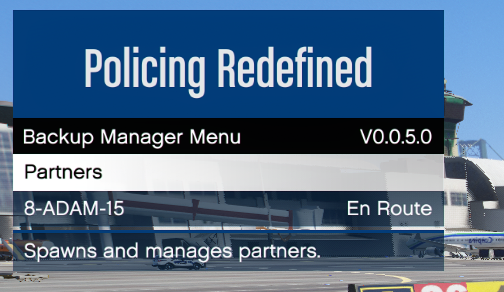
This is an additional fourth file allowing you to create list of names that you can assign to a
VehicleDivision. When PR spawns that vehicle division it will choose a
currently inactive name of the specified list and assign it to that unit. This way your units
won't be called e.g. LocalPatrol-1, LocalPatrol-2, ..., but instead you can give them realistic
names: perfect for immersion!
This is how to declare a CustomNameList:
id: The ID of this name list- A list of
Name
<CustomNameList id="div8_adam">
    <Name>8-ADAM-15</Name>
    ...
</CustomNameList>
And to your vehicle division you then add the name_list_id attribute:
<VehicleDivision spawn_distance="250" chance="100" name_list_id="div8_adam">...</VehicleDivision>
Simple as that! :)